Structs
You can define structs with the Rust language struct syntax.
Syntax
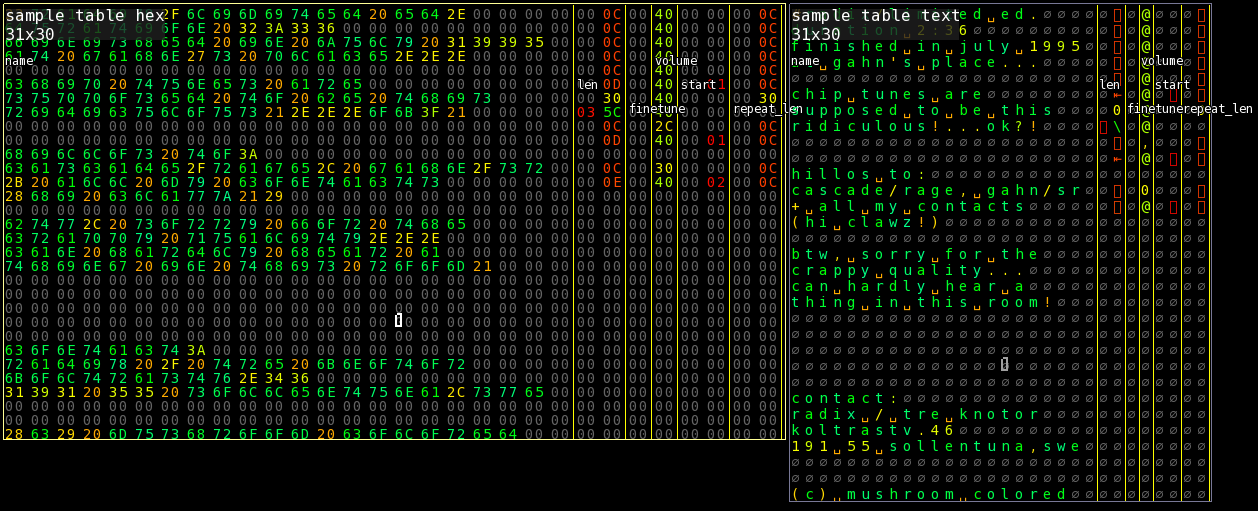
Here is an example struct for an instrument in the Protracker music format.
struct Sample {
	name: [u8; 22],
	len: u16,
	finetune: u8,
	volume: u8,
	start: u16,
	repeat_len: u16,
}
Adding structs
You can toggle the structs window with Meta -> Structs or the F11 key.
Write or paste your struct definition in the code editor, then click the Save button at the bottom.
Using as a ruler
- Click
View -> Ruler -> Add ruler for current viewto add a ruler if you haven't. - Hover over the
structmenu button, and click the struct you want to use for the ruler.
The ruler will now use your struct definition.
You can also hold down Alt to display the field names as an overlay.